A wedding planning spreadsheet, filled in
What a finished wedding spreadsheet looks like, tab by tab, using a made-up example couple.
Seeing a finished spreadsheet is the fastest way to decide what yours needs. This example is a made-up couple, Isla and Rory. They marry on Saturday 26 June 2027. Their budget is £30,000, and the sample guest list has 36 names. The numbers only show how the sheet works. Every name and figure is invented.
The dashboard
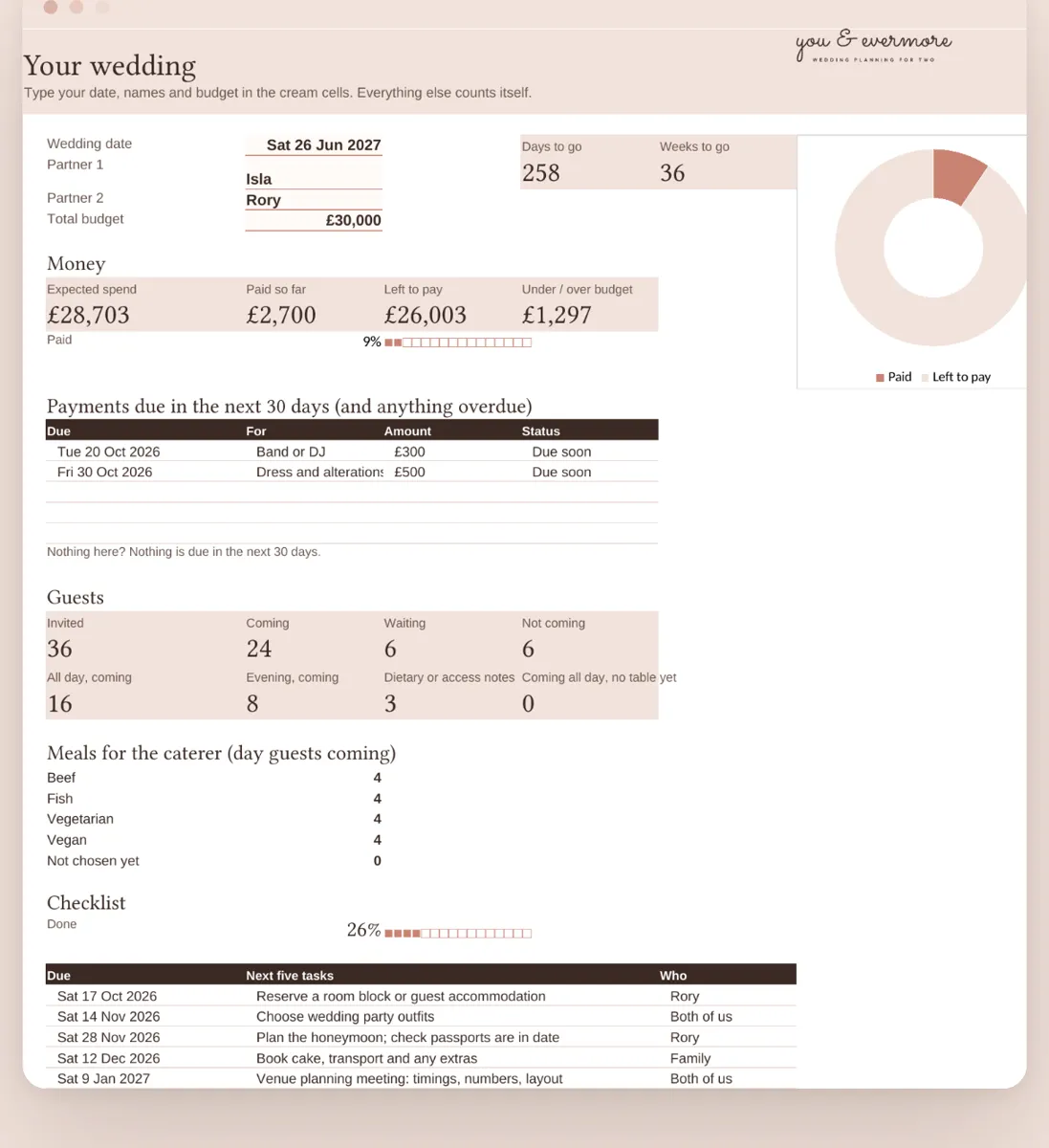
The first tab answers the questions you ask most. How many days to go? How much is paid, and how much is left to pay? Which payments are due in the next 30 days? How many guests are coming? And what are the next five tasks? Nothing on it is typed by hand; it reads the other tabs.
Budget and payments
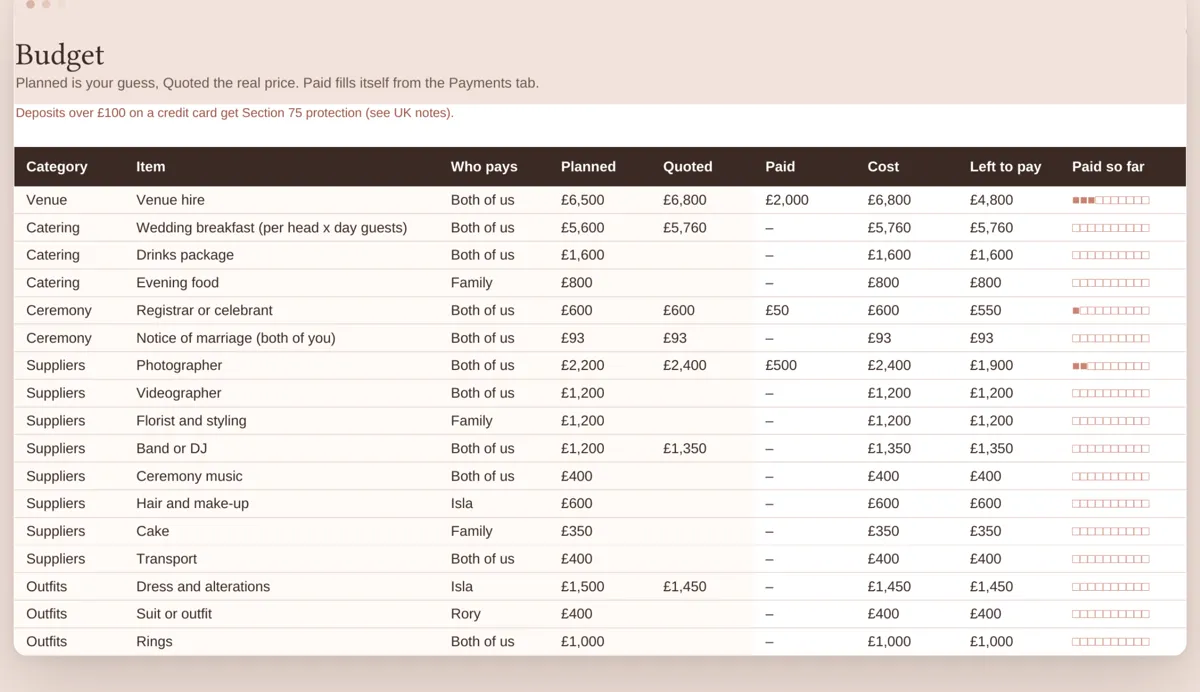
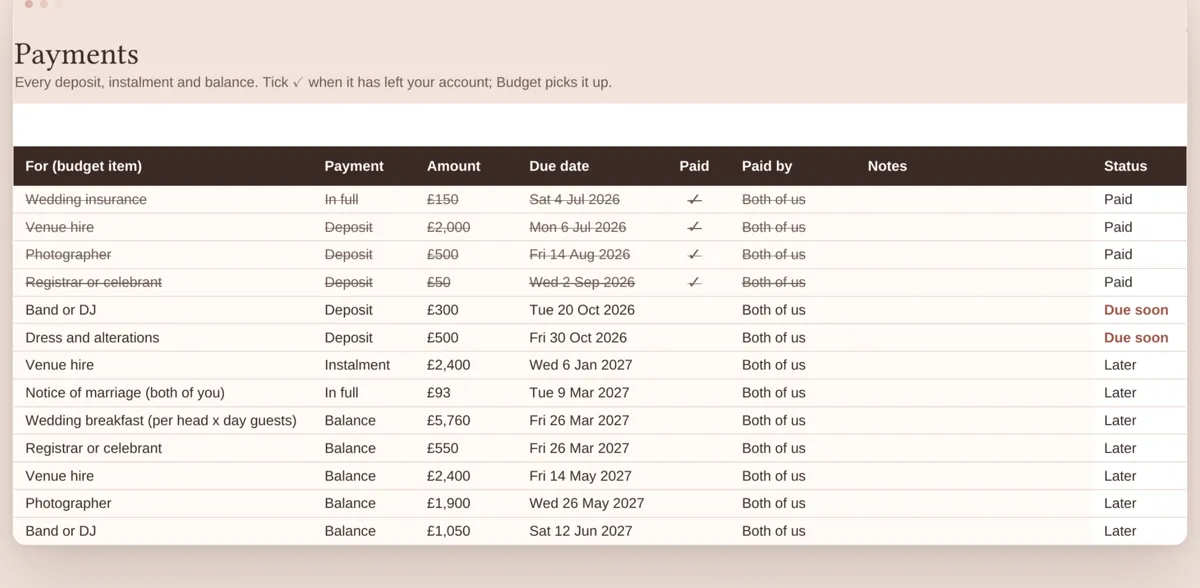
The budget has one row per cost, with planned, quoted and paid. Payments has one row per deposit or balance. When a payment is ticked as paid, the budget's paid column and the dashboard both update.
Guests and seating
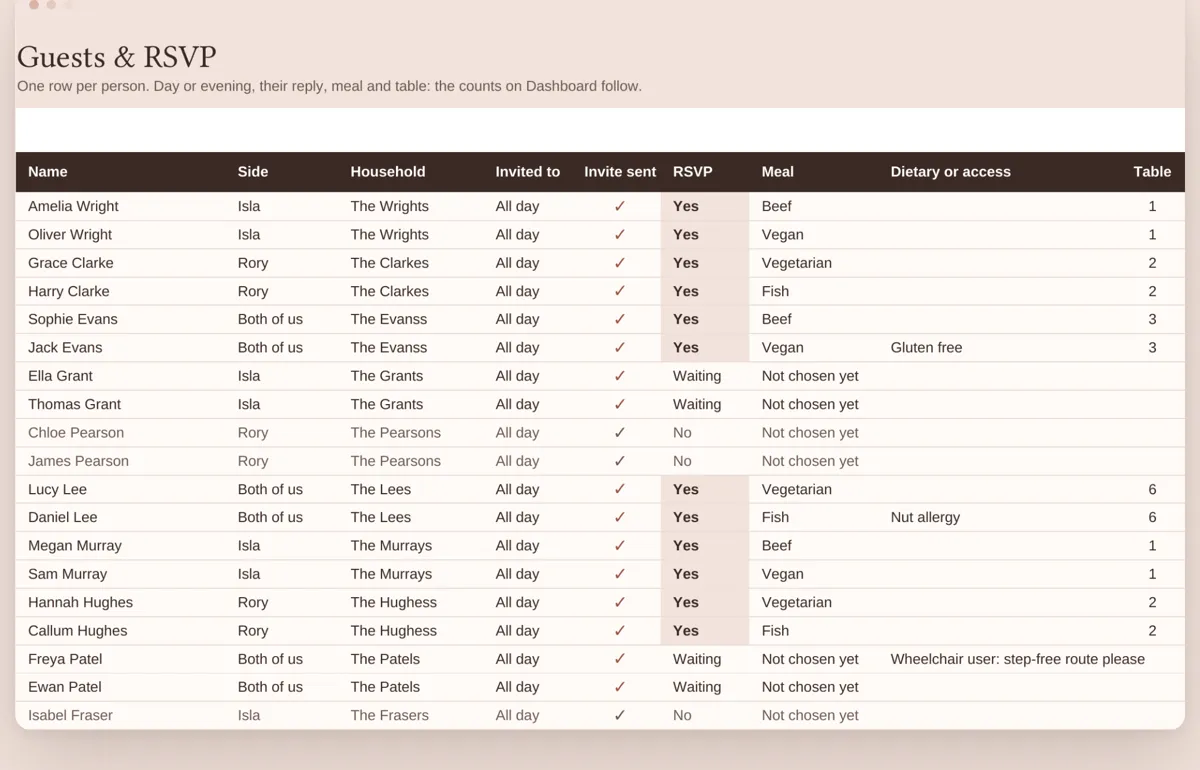
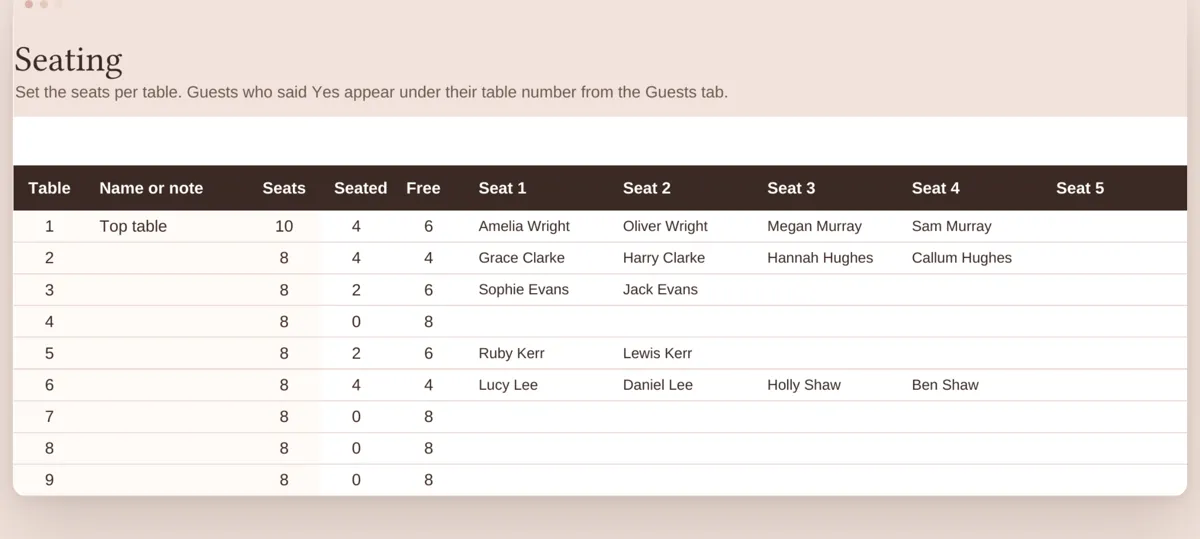
One row per person, marked all day or evening. Each row has their reply, meal choice and any dietary or access notes. Give a guest a table number, and their name appears under it on the seating tab. A table turns red when it is over its seats.
The checklist
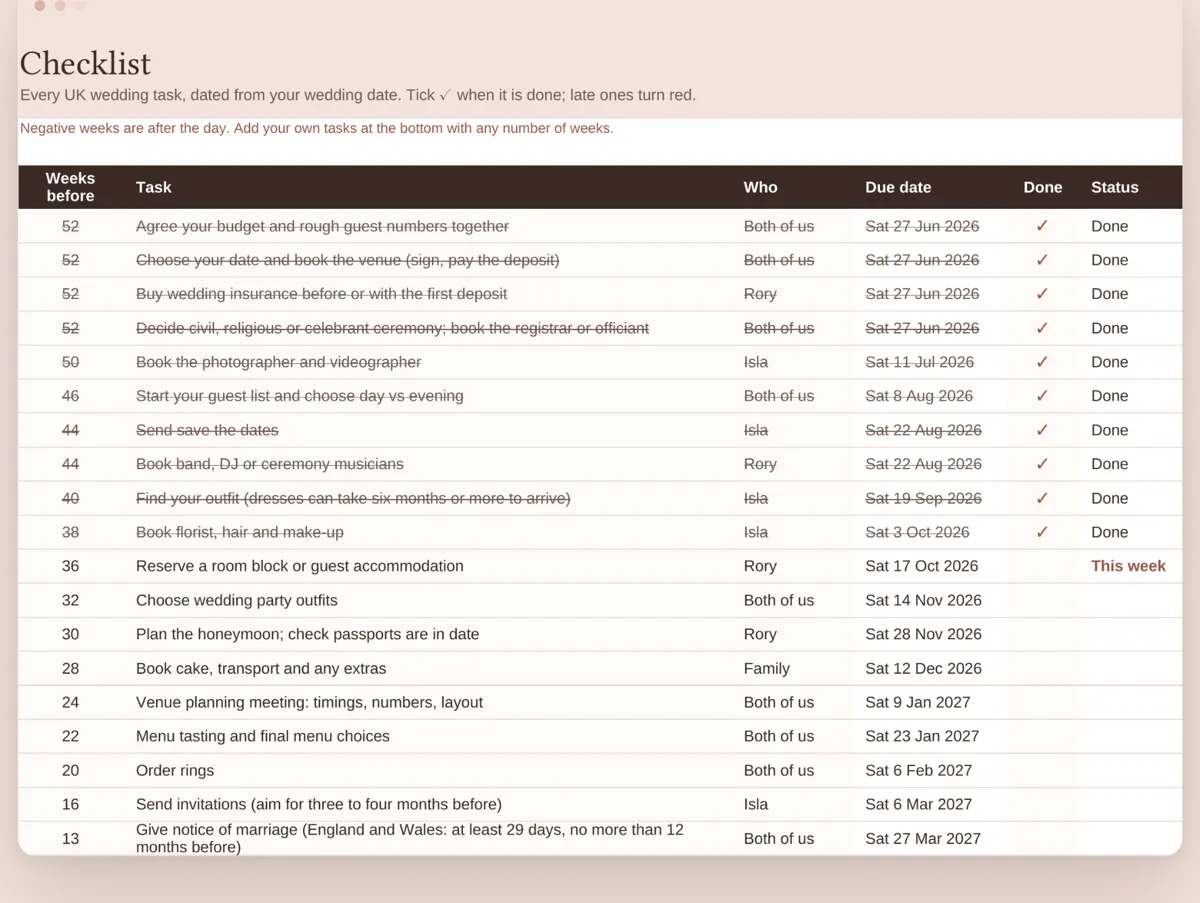
39 UK tasks, each set as a number of weeks before the wedding. Type the wedding date once and every task gets a due date. Late ones turn red, and ticked ones grey out.
What to copy into your own
- Keep the dashboard read-only, so nobody types over a formula.
- Count day and evening guests separately from the start.
- Put due dates on payments, not just on tasks.
The example above is the finished copy in our UK Wedding Planner Spreadsheet. A blank one for yours comes with it.
A week in the example
Here is how the example couple use it. On a Sunday evening they open the dashboard. It says two payments are due in the next 30 days. They are the photographer's second instalment and the florist's deposit. They pay both and tick them on the Payments tab. The dashboard's paid figure goes up, and left to pay goes down. Neither of them touched the dashboard itself.
Three replies arrived that week. They change those guests from Waiting to Yes and add meal choices. The counts at the top of the guest list update. Those are coming all day, coming in the evening, and meals by choice for the caterer. One guest needs step-free access. That goes in the access column, and later onto the seating plan.
Finally they look at the next five tasks. Booking the cake is due this month. One of them takes it, and the Who column says so.
Why the example is made up
Every name and figure in the example is invented. So you see the sheet full, with nobody's real details in it. It also shows every tab in use: sample guests, a year of payments and seating. Look at it first. Then open the blank copy and type over the sample rows with yours.
What a finished sheet should tell you at a glance
- How many days are left.
- How much is paid, and how much is still to pay.
- Which payments are due soon, and which are overdue.
- How many people are coming, day and evening counted apart.
- Which tasks are next, and whose they are.
If yours answers those five, it is doing its job, however it looks.
Questions
What tabs should a wedding spreadsheet have?
A dashboard, budget, payments, guests, seating and a checklist cover most weddings. Suppliers, a run sheet and gifts are useful extras.
Are the names in the example real?
No. Every name and figure in the example is invented.
The whole wedding in one spreadsheet
Our UK Wedding Planner Spreadsheet has the budget, payments, guests, seating and 39 dated tasks. It works in Google Sheets and Excel. Launch sale: 35% off until 1 December.
UK Wedding Planner Spreadsheet, £12.31 on EtsyPrefer Notion? Budget Planner, £7.02 on Etsy